Showing posts with label Mulesoft. Show all posts

Monday, September 18, 2017

Mulesoft API or SparkJava APIs - A Project Comparison

In this blog posting I will be comparing using Mulesoft and/or SparkJava Web Framework for APIs (Microservices).  This is meant to highlight the differences between an API platform and a lightweight framework for APIs and how they could even be leveraged together.

Fictional Scenario

I will be using the fictitious example at a hotel firm the current hotel customer management system is built on a J2EE application container with EJBs. The modernization is being driven the J2EE container is no longer supported by the vendor and the the team wants to move to a progressive web application powered by APIs.  The hotel has been using Mulesoft as the API management engine another for business area with pretty good success (APIs and Batch Mulesoft flows in production) and the hotel IT strategy is one of API first.  I will focus the discussion around one screen to manage the customer data (name, address, phone number, email, etc...) and how Mulesoft and SparkJava compare on the API front.

What is SparkJava?

SparkJava bills it self as "a simple and expressive Java/Kotlin web framework DSL built for rapid development".  My personal background for SparkJava was in researching it for this blog and for a review at my work. The one thing that jumped out at me was how super easy it is to create a routing for an endpoint as shown from their site:

1
2
3
4
5
6
7
import static spark.Spark.*;

public class HelloWorld {
    public static void main(String[] args) {
        get("/hello", (req, res) -> "Hello World");
    }
}


If you are not familiar with SparkJava web framework there site is a good place to start - http://sparkjava.com/ to learn more.

What is Mulesoft? 

Mulesoft bills it self as "MuleSoft provides the most widely used integration platform (Mule ESB & CloudHub) for connecting SaaS & enterprise applications in the cloud and on-premise".  I have been working with Mulesoft for around 18 months any the Anypoint Platform has top notch tools for API management that includes the API Manager, Design Center/Anypoint Studio and Exchange.

The API manager provides your the manage security policies, monitor APIs and set API alerts.  The Design Center & Anypoint Studio provide an online and downloadable IDE to develop APIs.  The Exchange contains your API listing for self service of existing APIs and allows for testing against mock APIs based on RAML only definitions.

More information about Mulesoft - https://www.mulesoft.com/

Mulesoft compared with SparkJava for APIs

API Security

My personal preference is that APIs should at a minimum have basic security with a client id and client secret to limit and track users of the API.  API managers can also provide additional security functions such as IP filters, OAuth 2.0 integration, throttling, etc... that will support you on your use cases needs.

Mulesoft:

Mulesoft's Anypoint API Manager provides you the ability to provision security policies on the fly or define your security prior to deployment that includes client id/secret, IP black/white listing, throttling, JSON/XML threat protection, OAuth 2.0,  etc...   Here is a really nice write up of Mulesoft features with some in depth details - https://blogs.mulesoft.com/dev/api-dev/secure-api/  

SparkJava:

SparkJava is meant to be a lean web framework and doesn't support API security without the need for custom code or additional libraries for security..

API Security Conclusion 

Mulesoft being a true API Management solution provides the expected security via the Anypoint API Manager and a light web framework like SparkJava this will have to be bolted on.  If your in a highly regulated industry or handle sensitive information I think the using a API Management solution is a must and if you don't then frameworks like Spark would be ok for APIs.


API Usage Metrics

Most product owners and development teams need to have insight into the usage of their applications/APIs.  These metrics are a foundational element needed for managing the future of product. 

Mulesoft:

Again Mulesoft is a true API Management solution and it captures metrics on every request to the API.  Mulesoft provides real time dashboards and custom reports that can contain request, request size, response, response size, browser, ip, city, hardware, OS, etc...  More details here - https://docs.mulesoft.com/analytics/viewing-api-analytics 

SparkJava:

Using SparkJava you would need to dump the same metrics that an API Management tool captures out of the box to either a log or data stream.  This will require additional coding for your application and the data virtualization platform for this.  

API Metrics Conclusion

Depending on your environment you may or may not have access to a data analytics solution like Splunk or Elk that would really make Mulesoft's metrics collection a must have, but if you do then a solution like SparkJava should only take minor log4j entries to get the same types of data out to be consumed.


API Discovery and Reuse

API reuse and discover is central to not reinventing access to data and will speed up a delivery team's ability to release new features or whole new applications.   Having one place to for all developers with proper security will allow faster adoption and keep data segregation.  API Management solutions should have this is a part of the base product

Mulesoft:

Mulesoft Anypoint Platform has the Exchange where developers can upload RAML that defines the API and others are able to find the API and even run mock tests against the RAML specs. The Exchange even allows for for UI and backend API development once a RAML spec is created and uploaded.  Engineers are able to find new APIs and even review current APIs to help others that come after them. More details about the exchange - https://www.mulesoft.com/exchange/


SparkJava:

SparkJava being a thin web framework doesn't have the concept of an API definition and no API repository.  This can be a strength and a weakness in the same respect depending on your use case and you could even use Mulesoft as an API reverse proxy with using RAML to define the end point and then mulesoft calling the SparkJava API under it.

API Discovery and Reuse Conclusion 

When building APIs having a central repository is key to help engineers find and reuse existing APIs. Mulesoft provides a really excellent product called Exchange where developers can share APIs and API fragments and it can even reference non Mulesoft APIs, but with limited functionality from the Mulesoft IDEs.  


Final Conclusion 

While this comparison really feels like comparing a skateboard to a automobile these types of conversations are occurring across IT departments and when a developer only has the lens of needing to get something done quickly then the answer would be something like JavaSpark, but this approach leaves many baked in features on the table when bypassing an enterprise solution like Mulesoft.  I would like to hear others thoughts on this topic.


Friday, September 8, 2017

Mulesoft Dataweave - setting payload fields to null and how to validate with MUnit

This blog post is I will explain how we are using Mulesoft's DataWeave to set a field in the Payload object to null and how to write a Munit test to validate it.

Why would you need to set the field in the payload to null?

The use case this is solving is using Mulesoft to read a CSV file and insert each row as a record into an Oracle database that allows for nullable values on date and number columns. The Mulesoft file input process will cast all fields from the CSV file to string fields in the payload object.  The date fields in the payload object will need to be converted to a Date object prior to the database insert and the number columns will need to be converted if they are null to a null object(Assuming the data is a number).  If this is not done the inserts will fail due to trying to insert an empty string into either a date or number column.

How DataWeave is used to prepare the payload for the insert into Oracle

Here is the snippet of the DataWeave that uses the when/otherwise expression to formats the date field if it is not an empty string and if it is an empty string set the payload field to a null objecct


1
2
3
$.EffectiveDate as :date {format: "M/d/yyyy"} as :string {format: "yyyy-MM-dd"}
    when ($.EffectiveDate != "" )
        otherwise null)

  • This same can be done for number objects minus the formating 
  • This is required due to Mulesoft's file connector converts empty fields to '' when processing a CSV file

How do validate the DataWeave with MUnit

Now we should validate that the objects are indeed null


1
2
3
4
5
6
<munit:test name="dataweave-test-suiteTest-Null-Id" description="Testing that a null Id works">
        <munit:set payload="#[getResource('src/test/resources/id/null_id_test_data.csv').asString()]" mimeType="text/csv" metadata:id="1225baba-0d21-4ddd-87c9-1273f42177c1" doc:name="Set Message"/>
        <flow-ref name="dataweave_set_null_example_sub_flow_transform" doc:name="Flow-ref to dataweave_set_null_example_sub_flow_transform"/>
        <set-payload value="#[payload[0].Id]" doc:name="Set Payload to record 1 Id " doc:description="This is required since there is no good way to assert a value is null in the MUnit framework.  So I take the value I want to check and load it to the payload and then run the Assert Null Payload next"/>
        <munit:assert-null message="Id for record 1 is NOT null" doc:name="Assert Null Payload - Id for record 1 is null"/>
    </munit:test>


  • The set payload uses a resource file that has one empty field to load the payload
  • The Dataweave was moved to a subflow to allow testing isolation and it is called directly from the MUnit test
  • The assertion of the null value is done by taking the payload field that should have the null value and setting the payload to it.  Then the assert-null is used to validate the payload is indeed null
    • This was done due not finding an easy way to check for a null value with MEL


Helpful Links


Tuesday, September 5, 2017

Mulesoft Operationalization - Log4j Overrides

In this blog posting I will explain how to create environment specific properties for log4j configurations.  While this may seem like a very rudimentary topic I have seen at times when log4j configurations have not been managed and has lead to sensitive production data being saved to disk or even passwords being logged to disk as well.  I assume a basic understanding of Mulesoft for this this posting and will skip over the basic steps

Create the Mulesoft Domain

  1. Create a standard Mulesoft Domain via the wizard in Anypoint Studio
  2. Update the Mule-domain-config.xml with the following snippet
    1
    2
    3
    4
    5
    6
    7
    <spring:beans>
            <spring:bean id="propertyConfigurer" class="org.springframework.context.support.PropertySourcesPlaceholderConfigurer">
                <spring:property name="location" value="test_${MULE_ENV}.properties"/>
                <spring:property name="ignoreUnresolvablePlaceholders" value="true"/>
                <spring:property name="ignoreResourceNotFound" value="true"/>
            </spring:bean>
        </spring:beans>
    

    The bean will read in the property file (Name:Value)
    The location property has ${MULE_ENV} and this is used at run time to inject the environment value
  3. Create your environment property files under src/main/resources.  My example I have two and the name pattern is app_${env}.properties:
    1. test_dev.properties
      1
      2
      simple_log4j_example_log_level=INFO
      app_2_log_level=DEBUG
      

    2. test_prod.properties
      1
      2
      simple_log4j_example_log_level=INFO
      app_2_log_level=INFO
      

Create a Simple Mulesoft Application

This step will be creating a simple Mulesoft project that references the above domain.  The application will contains a single flow that listens on port 8081(http://localhost:8081/test) and returns the current log level and logs both the simple_log4j_example_log_level and the app_2_log_level from the property file specified at run time.

The following edits have been made for this: 

The change required to override the log4j configuration is done on the log4j2.xml in src/main/resources/ by updating the AsyncRoot to reference the property name from the domain property file:

1
2
3
<AsyncRoot level="${simple_log4j_example_log_level}">
   <AppenderRef ref="file" />
</AsyncRoot>

Pulling this all together

Inside Anypoint Studio you will need to update the Run Configuration to include the following VM argument:

  • -DMULE_ENV
    • To use the dev properties file it would be:  -DMULE_ENV=dev
    • To use the prod properties file it would be:  -DMULE_ENV=prod
This argument will be used by the domain at startup to pull in the correct properties file.  

Once your application is up and running you can go to http://localhost:8081/test and see the response of the current log level for the simple_log4j_example_log_level.  The log connectors can be changed to validate the properties file.  

This is one of many ways this could be managed and I hope this helps others keep their logs clear of information that shouldn't be there.

Helpful Links

Wednesday, August 30, 2017

Mulesoft Milestone Demo: Mule 4 and Studio 7 - Highlights & Discussion (Part 2 of 3)

In this post I will discuss the highlights of the Mulesoft's webinar -  Mule 4 / Studio 7 Beta Walkthrough. This webinar is the second part of a three part series that Mulesoft is providing to introduce and drive beta testing of the new Mule 4 platform that includes improvements to the Anypoint Platform, release of Studio 7 and release of Mulesoft engine 4.

FAQ Review

  • Mulesoft is looking for feedback to what they have changed in mule 4.  I will be downloading and trying out some of the new features and look for additional posting as I dive using 
  • Some  users are having issues with new Studio with no connectors and this is caused by not having the JDK in the system path before any jre installations.  Studio 7 requires the additional tools from the JDK to run all the components.  I hope this is called out in the documentation or a check is added to the start up of Studio 7 letting the users know.  Here is a screen shot of the error from the webinar:
Error from Studio 7 when the JDK is not used to start it
  • Mulesoft now has a page tracking the changes for Mule 4 - https://mule4-docs.mulesoft.com/mule-user-guide/v/4.0/mule-4-changes
  • The next Mule 4 Beta release will focus on - Mule SDK, CE distribution with DataWeave(This could be an interesting development and might allow for a hybrid license/open source deployment models), APIkit DataSense support, Scripting components, API Gateway, DataWeave support for COBOL copy book/flat files and new connectors

DataWeave Expression Language

  • Why DataWeave?
    • memory handled by the egnin
    • random access
    • concurrent access
    • cache payloads if larger than memory
    • reduce steps in flow - don't have to learn MEL and Java to get access to data
  • When to use DataWeave?
    • Mulesoft's opinion is that integration logic should be broken apart for separation of concerns, testability, maintainability and using the best tool for the job.  I agree with the  
Mulesoft's stance that Flows should only sequence data and operations, Expressions should transform, extract and make flow decisions and code should be used for business logic and formatting
      • Flows - should only handle sequencing of data and the operations of data.  I do agree that this makes sense that flows are well suited to control the flow of the data and operations against the data.  This really shines in the studio with the ability to create a visual shell of how data and operations to data would work without writing a line of code.
      • Expressions (DataWeave) - Mulesoft has optimized DataWeave for data and with built in streaming it makes it easy to have random access to the data throughout the flow,  the code will be less verbose and easier to maintain
      • Code (Java Classes or Groovy, JavaScript (Rhino), Python, Ruby, or Beanshell) - Mulesoft recommends externalizing the code outside of mulesoft and allowing mulesoft to make calls to it.  This really seems no different than the API Led Connectivity and if your calling code it really should be built as a micro service that could be fronted by a Mulesoft API or not.
  • Calling Java code from DataWeave 
    • The webinar does a review of how to call Java code from DataWeave, however I would avoid doing this so the DataWeave expressions focus on data and not business logic which can be built in.
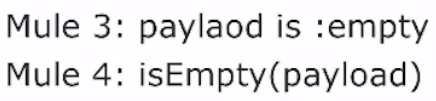
  • Simplified Precedence Rules
    • All operators and traits are functions in Mule 4 will make it easier to understand DataWeave
Example of Mule 3 and Mule 4 for Operators in DataWeave
    • The style for name types seems cleaner to me, but I think this is really just a personal preference on this change 
Example of Mule 3 and Mule 4 style changes for type names in DataWeave
    • The additional parentheses will drive developers up a way, but I think in the end we will actually appreciate the auto complete when building complex DataWeave operations
Example of Mule 3 and Mule 4 for order of operations for DataWeave
    • Typing for Variables/Function Parameters
DataWeave Function and Variable Definitions
    • Multi Line comments is now supported!!!!
Example of a multi line comment in DataWeave

Streaming

  • Payload is read into memory as it is consumed
  • Concurrent & random access is enabled
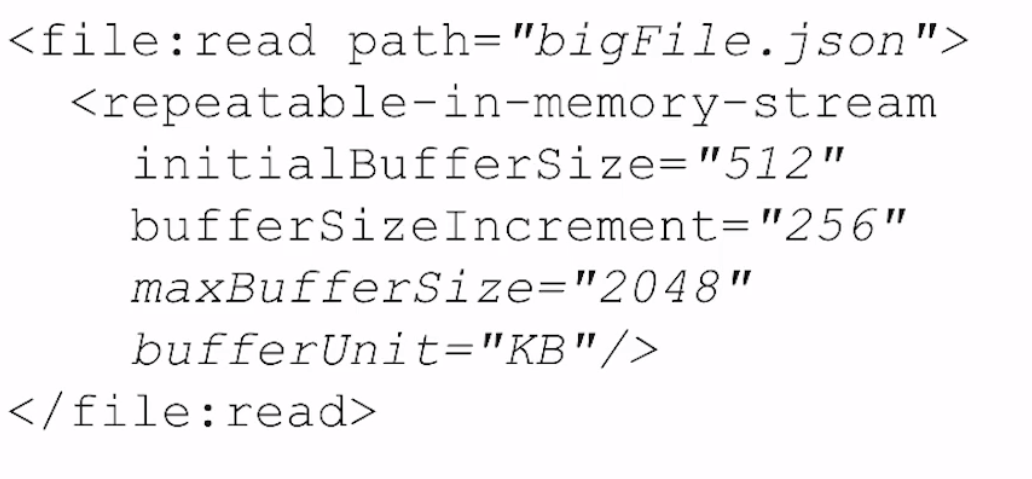
  • Streaming defaults can be customized on a stream strategy 
    • File Store (This approach is actually faster than in memory)
      • half MB stored in memory and rest is stored to disk and read in in half MB chunks
    • In Memory
      • half MB stored in memory and is incremented
    • Example how to configure the stream:"
Mulesoft Stream Configuration Example

    • Streaming can be disabled
    • Streams can work for object as object streams
Mulesoft Object Stream Example

Execution Engine

  • Processing strategies and exchanges no longer needed
  • Flows are non blocking
  • Flows are synch by default (Same as Mule 3)
  • Use async instead of one way exchange pattern
  • Global thread pools for all flows
    • These pools can be configured 
    • Thread pools are now built around I/O, Light CPU and Heavy CPU and the number of threads is optimized for you
  • Controlling Concurrency - Coming soon in a release candidate and will be controlled at the flow level and it is not controlled at the thread pool level
    • This removes processing only one message at time for that use case

Additional information:

Monday, August 28, 2017

Mulesoft Milestone Demo: Mule 4 and Studio 7 - Highlights & Discussion (Part 1 of 3)

In this post I will discuss the highlights of the Mulesoft's webinar -  Milestone Demo: Mule 4 & Studio 7.  This webinar is the first part of a three part series that Mulesoft is providing to introduce and drive beta testing of the new Mule 4 platform that includes improvements to the Anypoint Platform, release of Studio 7 and release of Mulesoft engine 4.

Simplified Development and Studio 7 Improvements 

Data Access and Transport Streaming

  • Dataweave can be used directly in connectors.  
    • This should help developers have a common data access model
    Screenshot of Dataweave in a choice
  • Auto Caching of payloads larger than memory space 
    • Developers will have to be cognizant that the cache would most likely be not encrypted on disk and care will have to be taken when dealing with  PHI or PCI data)
  • Mule now allows access to payloads without the need to transform to java objects
    • This will reduce clutter in flows and allow for developers to focus on the work and not transforming data.

Simplified Connectors (File, JMS, FTP and VM)

  • Now operation based such as read file, write file, read jms, etc...  
    • Studio 7 will actually have new connectors for each operation which will make it a lot easier to use these types of connectors 
  • Retry logic will be built in
    • Really looking forward to more information about retries as this is a pretty basic use case in data integration 
  • Mulesoft provided a simple flow with a filewatcher, File Create Directory and File Write connections to highlight how it will work
Mulesoft Flow where reading a file and write is three steps and shows how the developers can focus on business value and not simple data transforms

Try Catch Scope Improvements

  • Try block introduced to allow try catches at any point in the flow
  • Errors that can be caught are now displayed in Studio to allow for easier 
  • The catch block can propagate errors to calling flows
  • Improved exception information and still able to get low level exception trace
  • Example from the slide deck that highlights wrapping components and how the error types are called out:

1
 2
 3
 4
 5
 6
 7
 8
 9
10
11
12
13
14
15
16
<try  
  transactionalAction=”ALWAYS_BEGIN” 
  transactionType=”XA”>
  <http:request .. />
  <email:send .. />
  <error-handler>
 <on-error type=”500_STATUS_CODE”>
   <notify-admin-of-possible-bug/> 
 </on-error>
    <on-error type=”CONNECTIVITY”>
      <notify-admin-critical-error/>
    <on-error>
    <on-error type=”WRONG_ADDRES”>
      <send-email/>
    </on-error>
  </error-handler>

Runtime Changes

Connectors distributor outside the runtime

  • The runtime now isolates the connectors from the runtime which allows the connectors to be upgrade independently of the runtime.  This will be be helpful if you need a new feature of a core connector, but don't have the time to wait for a full upgrade
    • It appears that the Anypoint Exchange will be how the connectors will be managed and it also appears from the webinar that you will be able to extend your APIs as connectors in exchange and then pull them into Studio 7.  If this works as it looks it will drive reuse and make it really use to use other teams APIs

Self Tuning Runtime


  • Mule engine is now non blocking
    • This will help with high load APIs and interested in any metrics Mulesoft will have around this
  • Tunes based on the workload such as high IO processes will be handled differently than high CPU loads
  • Global thread pool with reduced memory footprint


Mule API and SDK

Single Extensibility Layer


  • Mulesoft will now have a single extensibility layer for Java components, Mulesoft flows and API specs (RAML or Swagger)
  • Consistent UX for all connectors
  • Enhanced metadata that will allow the Exchange to track dependencies of APIs, measure impacts and measure reuse

Mule 4 Migration 

  • 3.X will continued to be supported till 2021 
  • 3.9 is already planned
  • Migration tools are being developed 


My thoughts are Mule 4 is going to be an exciting update to the platform and I can't wait for the remaining parts of the webinar.  I hope mulesoft provides additional in depth details around the items in the presentation.

If anyone would like the slide I have found them available at -  https://www.slideshare.net/eaiesb/mule-4-and-anypoint-studio-demo

If you would like to have access to the Webinar or sign up for part 3 - https://www.mulesoft.com/demo/beta/mule-4